Hi, my name is Tom Smykowski, I'm a staff full-stack engineer. I build and scale SaaS platforms to millions of users, working end-to-end from system architecture to frontend to mobile. On this blog I share what I learn about software engineering, innovation in operating systems, and enhancing user experiences.
What This Article Covers
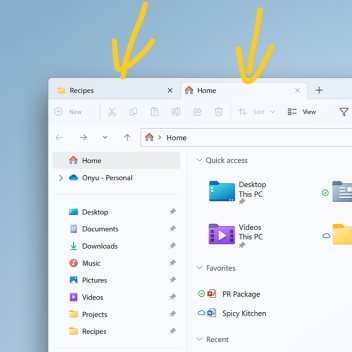
Explore the exciting new features introduced in the Windows 11 18/10/2022 update. This article delves into the enhancements made to File Explorer, the integration of suggested actions across the system, and improvements to multitasking capabilities. Discover how these updates can streamline your workflow and improve productivity.
Questions This Article Answers
- What are the new features introduced in the latest Windows 11 update?
- How does the File Explorer tab feature improve user experience?
- What is the Suggested Actions feature, and how can it be utilized?
- How have multitasking capabilities been enhanced in this update?
- What other minor changes should users be aware of in this release?
Length and Time
A comprehensive overview of the latest Windows 11 update with practical insights. Approximately 7 minutes to read.