Adham Dannaway shared a post showing that big companies don't always have great designs. He used Instagram's login page as an example. I found 21 issues and redesigned it.
Adham Dannaway is a well-respected designer and author of Practical UI, a book that everyone aspiring to do any design work should memorize.
He's right. Corporations such as Meta that owns Instagram, and even Google, aren't good examples to inspire yourself regarding user experience and design. For example, both use placeholder instead of input label. The biggest culprit of Material Design, but not the only one.
Some years ago Amazon's login flow was described by some people as the standard of how login flow should be designed. But everyone knew it was one of the worst flows. When I seen these blog posts boasting about how it's great, my eyebrows rose.
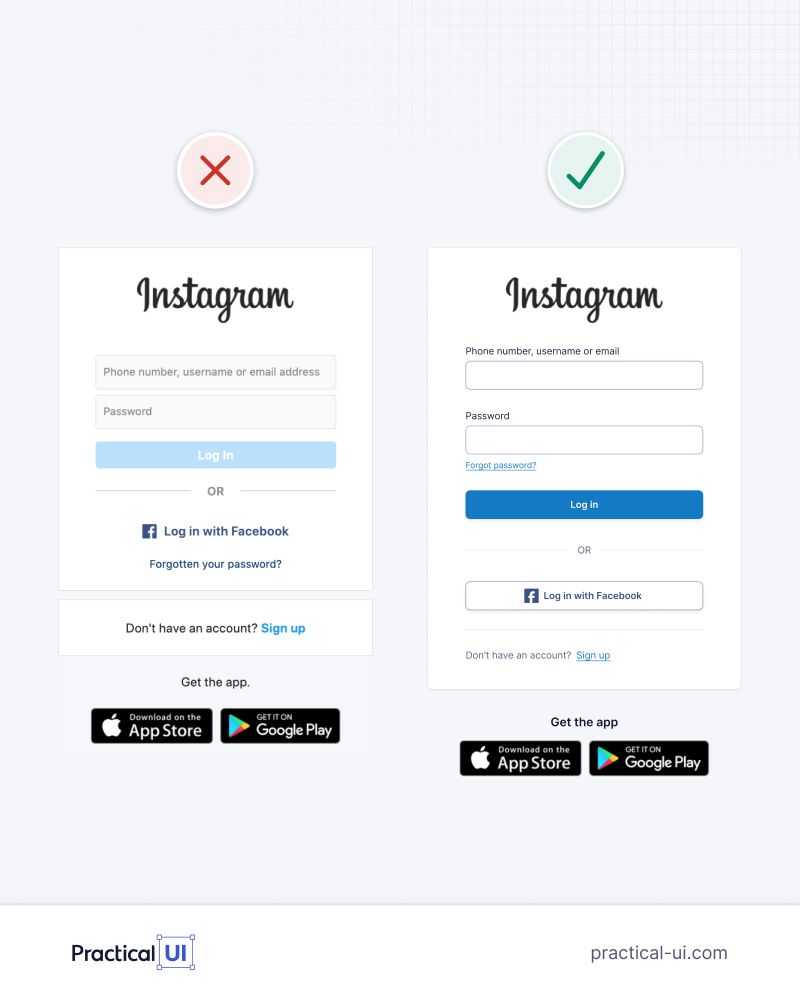
And the login page of Instagram was also not a good example of design. Just look, the left one is by Instagram, the right one with improvements by Adham:

Actually Adham asked what more we could do to improve it and I posted some of my principles that got over 10 thousand views. They included:
- Group the login fields and the login button together
- Make it immediately clear that this is the login page, not the registration page
- Add a password visibility toggle so users can show or hide their password
- Remove the Facebook logo and the App Store logos, and align these buttons with the rest of the design. While branded buttons are common, they draw too much attention away from the primary actions
- Integrate the "Get the app" section into the overall design instead of treating it as a separate block
- Make the sign-up flow more prominent
- Increase the spacing between the app download buttons—they still feel too cramped
- Use a darker shade of gray to improve accessibility. For example, some users may struggle to see the divider line around "OR"
- "Phone number, username, or email" presents too many options at once. I'd first let users choose their preferred login method, then tailor validation and input accordingly (e.g. show a country code selector when "Phone number" is selected)
- Consider centering the "Don't have an account?" section to create a more streamlined visual flow
- Align the "Get the app" typography with the rest of the page
- The app download buttons are slightly wider than the main content. I'd align their width with the rest of the layout
- Make sure the "Don't have an account?" text wraps gracefully in languages with longer translations
- If Instagram has sufficient brand recognition, consider making the logo slightly smaller so more of the content fits above the fold on mobile
- Modernize the drop shadow of the main card/container
- Define the page's primary objective before refining the design. For example, is the goal to maximize logins, encourage registrations, promote app downloads, or balance all three? The visual hierarchy should reflect those priorities
So the list is quite long. Not only corporations suffer from such problems, also startups aspiring to be on the edge of user experience. Corporate has its constraints but design is also influenced by business, lack of skills, assumption of having skills and lately: AI. External information can help build great experiences, but can also degrade it.
The same way I can give a doctor my symptoms and even what I think about them, but I can't replace a doctor that studied and has living experience with a lot of cases, knows what can be the cause and what it is not.
In a way, beyond some point design and user experience isn't a compromise, it's a strict discipline, where changing one small element can break the whole harmony. That's why maybe we have to experience so many bad designs. Because people that don't know about it tend to break a lot of stuff.
Two Conflicting Trends in Design
Lately we have two additional conflicting trends caused by, of course, AI. One trend is that professional designers and design developers get a new tool that improves our work. On the other hand the same tool gives unskilled people impression that they know what they're doing.
People tend to think design and user experience is about how things look. And to some extent for sure, it's important and it's more of a design domain. But user experience goes beyond. It analyses flow, hierarchy, accessibility, alignment to goals, cognitive accessibility, common patterns of cohorts, and so much more.
Usually a skilled person that is trained in user experience when looking at a design sees it in multiple layers, and can pinpoint a lot of things that causes friction for people and lowers such business metrics like conversion or sales where the role blends with conversion optimization.
Explaining all the layers of analysis to an unskilled person, and especially one that thinks AI gives all the information, is hard. AI won't tell you about things you won't ask for, and you don't know to ask for. That's the problem with AI. But let's get back to the Instagram login page.
The New Instagram Login Page
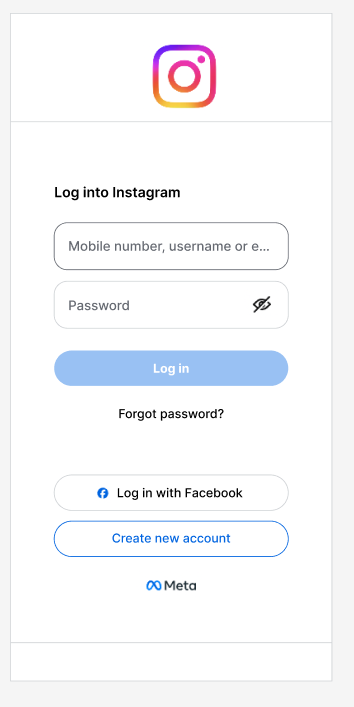
Meta's design team seemed to recognize some of the problems the login page caused and redesigned it some time ago. It looks now like this:

We see some nice improvements. For example the login section is rather grouped correctly, we have show password button, and overall there's less flows in this page. No store buttons, however this is more of a business decision. The login section is named ("Log into Instagram"). Overall the design and user experience of this version is better.
However, there's still a lot of things we can improve here. And regarding how it looks like in 2026 it's something we should do. AI helps in our work, so naturally the bar for everything will be higher. So by fine tuning design and user experience we can gain a component of competitive advantage.
We can of course not offer high level user experience, but focus on pivots and market fit, then rapid development makes sense, focusing on functional features, but being aware we have a design and user experience debt to pay off at some point. At least, we should make sure our customers and users can use our system without major issues on major routes like registration, login, onboarding, discovery, and payment.
When you look at the Instagram login page how many things you can find to improve? Count them:
If you found five issues, that's a good result. 10 issues - quite well. I found 21 issues in total. We'll go over them now, so you can see what can be done to improve it, and apply to your own design and user experience work.
Who Visits This Page and Why
First we have to answer some important questions: who visits this page and why.
The answer seems to be obvious: people who want to log in. However, if we'll go into details we already will have more information we can use for our design work.
Instagram is used by 3 billion monthly active users. It's used by men, women, people of all ages, from all cultures, using different languages, alphabets, LTR and RTL writing direction, and various impairments, education levels, cognitive styles and mental health conditions, and in various device conditions (worn down displays, strong light etc.)
Do you know that 42% of your visitors can struggle with your content due to things like ADHD, age etc.? That's why I've created Pageperson Insight that shows you how different people see your website or app, or store, so you can improve it. 42% is a lot. Improving page for cognitive accessibility can hugely impact business outcomes.
Instagram login page has to accommodate to everyone basically around the world. At least if we want to maximize usage.
Header Issues
Let's look at the header of the page:

Already we see several problems:
- Header doesn't contain service name
- The logo is placed weirdly
- The border won't be visible on all devices and to all people (worn down screens and visual impairments, age etc.)
- The grey color doesn't align with the logo colors (fun vs corporate)
In fact previous version of the login page was better, because it had the name, no border, though space could have been better:

So we see here regression and probably, that's my guess, business wanted to use the new logo everywhere, so it was placed in the login page, exposing that the logo itself doesn't work in literally basic usage.
Instagram brand book doesn't offer other logo, and brand elements page doesn't work. So I'm unable to check if there's a version of the logo with the name. That would make much more sense.
If it comes to border color, it's #D0D3D6 with contrast ratio around 1.5:1. WCAG AA requires ratio of minimum 3:1, while anything closer to 5:1 is even better.
Some people may say that stronger border will break the design. It may, and it shows a deeper problem. If we use decorative elements or borders that half of the users won't even see, do we need them at all? And if yes, how to accomplish the same effect for all users. I'll show a proposed redesign later, because it requires aligning all elements.
Login Section Deep Dive
Let's move to the second section. The login section:

Here we have to start to think about the user flow. Is the login flow the most important one? We have actually four flows in this page:
- Login
- Resetting password
- Log in with Facebook
- Switching to creating a new account
It's a login page, so login flow seems to be the most important. It would be different if we wanted to prioritize people to log in with Facebook. But since Instagram doesn't prioritize we can assume people use different logins (and hopefully passwords) to log into Instagram rather than using Facebook flow.
I'll talk about the visual hierarchy of the flows later. But now let's just look at atomic elements of the login flow.
Since in the header there's no information what is the service we log into, someone on the design team named login section "Log into Instagram". Which is a compromise, and at least tells what we can do, and where we are.
However, the information where we are is important and it should be mentioned in other place, not in this particular section.
The only reason to indicate it here is to distinguish it from the logging in with Facebook:

However, there's no repeating pattern here, and if it was initially, it's broken.
"Log into Instagram" is semibold header, while "Log in with Facebook" is a semi-secondary button, with icon, and different wording "Log into" vs "Log in". While the wording is just incorrect, we see that rest is a compromise caused by the glitch in Instagram / Meta business itself.
Inconsistency in how you log in to Instagram either by its own authentication system or Facebook surfaces as a user experience friction, and we see in the design, this friction propagates to a series of compromises.
Just a side note here, when I've recreated the design of Instagram I've used Inter font, because Instagram uses Optimistic, system-ui and Sans Serif. In that precise order.
Except for the header. For header Instagram uses Optimistic, Segoe UI Historic, Segoe UI, Helvetica, Arial and sans-serif. Which seems like just a tech debt. Anyways Optimistic is used as the first one and since it's available it's used for every text here. I note that in case you see differences in typography between Instagram login page and my redesign.
Input Field Problems
The login section combines the highest amount of issues we'll walk through:

Field names should be above the fields, not as placeholders. Otherwise, the information what you can type disappears when you start to type. On Instagram when you focus field, placeholder moves to the top of the input. It has the font size of 8px and color that is something around #8A919B making it inaccessible. The contrast is too small, and color makes it worse. Some people won't be able to read it. The field name should be above the field, with proper contrast and font size. It's not for 1% of users, it's for around 30% of people who have vision impairments, and around 30% that use worn down screens.
In my design the placeholder "Mobile number, username or e" contains ellipsis. In the original page, there's no ellipsis and the text is cut. In other languages that are more expressive, more of the placeholder will be cut. Password management systems add icons in input fields. So overall we'll see much less. For example we won't see we can type email:

It won't be a problem though when we get rid of placeholder as written above.
In the login field we can type: mobile number, username, or e-mail.
I see that it was done to lower the friction and not force user to make more decisions. If user recalls phone number first, he types that, if username - he types user name. And if email: email.
I don't want to rant about the login page. That's ok. However. There's one practical effect of this decision. We can't validate the input. For phone number we could allow choosing a country code, or even infer it from user location. If user provides username, we could hint him if he types incorrect symbols, and for e-mail we could validate the email immediately.
It's a matter of considering if it's worth and what converts better. In this case A/B tests do a great job figuring out what is the best solution. If Instagram offers one field for everything I guess, A/B tests shown solid proof that it's the most friction-wise compromise.
In our designs and user experience work, we have to however always consider it, and do A/B tests, because it's not a pattern that will work in all cases. In some it won't.
Password Field Analysis
What I like in the new design is that the password field has a "show password" icon. It's good and useful so that people can validate if they typed their password correctly. Not everyone uses password management apps. So it's ok.
What we can improve here is two things:
The icon is too small. You have to click precisely in the icon to toggle it. From what I see it's around 21x21 pixels. Tap area on mobile devices should be at least 44x44 pixels. Otherwise you risk misclicks. In this case, which is very visible across the whole Meta ecosystem, icons on input fields suffer from this problem.
It's too prominent. What happens is that user tries to toggle the "show password" icon, misclicks. Around the icon there's input field for password. So misclick hits the input field. Clicking an input field causes depending on device two things: a) browser scrolls and/or zooms to that field, b) screen keyboard opens.
So a goofy misclick causes a cascade of unwanted, confusing actions.
We can't really make an icon that big. 44x44 would be too big. But there's a solution for that we can use with success. We can make the space around the icon either triggering the icon, or a dead zone. I like the first one better. Because no one taps around that icon to type the password. It's a nice trick to prevent such misclicks that is totally invisible to the user. He doesn't even have to know he misclicked, because it will do what he wanted.
Color and Contrast Issues
Last but not least, we can look at the colors. Text color is #666A72 with ratio around 5.5:1. It's quite ok, and is compliant with WCAG AA, but is too small for AAA. However I understand the design choice here made.
The border of not focused field is not correct.
#D9D9D9 is too light for 1px border. Some people won't see it. It has a ratio of around 1.4:1, while WCAG 2.2 requires at least a ratio of 3:1.
Worth noting the input fields have, as far as I can see, standard focus outline. It's good for accessibility, however the color theme can be adjusted to the rest of the design:

Forgot Password Link
Now let's move to the "Forgot password?" link, here's how it looks like in the context:

The way person skims this page is as follows:
- "Log into Instagram" (bold dark)
- Fast skim through input fields and "Log in" button (pale) with drift towards the strong "Toggle password" icon
- Sees "Forgot password?"
(I ignore here how the rest of the page steals attention)
I feel like this section more than anything encourages visitor to reset password (btw. we have to make sure the tap area is good, even if it's a text link). It's not something I'd expect from a login page. It may be that Instagram overall has a high rate of password resets, and then it may make sense. On the other hand, still, we have to take into mind resetting the password is secondary action. I like that it's called "Forgot password?" aiming at what user experiences rather than step further "Reset password" that is rather a solution rather than stating what user problem tries to solve.
We covered already a lot of things, as you can see on this screenshot from my Figma file:

We'll move to the bottom and I promise it's all. Then I'll show one proposal of how the page can be improved! We're not here to roast Instagram login page!
Bottom Section Analysis
The old design had a lot of issues that were fixed, but one thing that conceptually made okayish sense was the "OR" break:

In the new design it was removed and replaced by spaced separation of blocks which contributes to the clean design:

What can be improved here:
- The "Log in with Facebook" and "Create new account" could be more visibly secondary
- The Facebook logo is unnecessary friction in the flow
- Border of the "Log in with Facebook" button is too light
- "Log in with Facebook" and "Create new account" are grouped however they aren't a group. Logging in with "third party" or "creating account" are two separate flows. It's problem caused by the business decision to have Instagram and Facebook login, so it's hard to fix it in the design
- Personally, the "Meta" logo is unnecessary. The page is already overloaded, I'd remove the logo
- On the bottom of the page there's also a border, and it has bad contrast too:

There's even a menu below but I won't go over it because it's not any of the four main flows, and this article would turn into a book :)
Summary of Issues
Just to summarize main issues we identified are:
- Contrast issues
- Placeholder issues
- Text fitting issues
- Misclick issues
- Flow issues
- Hierarchy issues
- Attention issues
- Theme alignment issues
- Branding issues
So it was a great time, because we hunted down some things, and that's productive, because we can do something with them. And think about such issues on our designs and experiences.
The Redesign Proposal
So what we'll do with all of this knowledge? We can redesign the Instagram login page.
First thing we have to sort out that in this specific login page we have four main flows:
- Login with Instagram
- Login with Facebook
- Create account
- Remind password
And additional three "hidden" flows:
- Login with Instagram with phone number
- Login with Instagram with e-mail address
- Login with Instagram with username
So in reality we have 7 "flows". It deserves breaking down the login page into two pages.
I didn't put too much effort into designing the first step, because this article is already too long. It shows only functional draft of how the first page can work (not look finally):

What we can see here is that I've made a thing known only to barbarians and I put cut logo on the top, and used some colors from the new logo for the "instagram" name. The purpose of that wasn't to cause heart attack at brand designers, but just to show how we can place brand at the top with the brand name if we have logo in various formats and also the name. Idk if Instagram has such, so I just did some mockup here.
Below there's a blurred logo that gives some additional depth to that page, however it's very slight and not obligatory in any ways.
The main point is that we have bold question to the user, and we offer three sections:
- Login with Instagram
- Login with Facebook
- Create account
Because we have more space here we can decide what flows should be prominent based on conversion data and knowledge about our users as audience and sometimes individual. If we direct user from Facebook to Instagram login we could prioritize login with Facebook with more sophisticated design for visual hierarchy and so on. So the page doesn't have to be dull.
Adding this step is however crucial to do something to the next step that I mentioned. De-cluttering it.
The Final Login Page Design
The design would require some additional care, but overall it looks like this:

We see repeated patterns from the previous page. We have "logo", name of the service. So user knows where he is.
The "Login to your account" says specifically what the user will be doing now, increasing cognitive accessibility of this page.
Since in the previous page user chose to login with phone number, now we can use that knowledge.
We allow him to choose country from a dropdown and the mobile number.
Something controversial here is that the country field is separate from the mobile number, and I think that is something cogent if you create international service.
Choosing country causes a lot of friction on 99% pages and in 99% apps out there. You have to click small arrow or section of input that is also smaller than 44x44. Then you see some dropdown that is also small and off.
But there are over 200 countries and territories on Earth. It has to be made easy.
To make it easy we can infer the country from the data we have and preselect country of the user. That gives us the country code for the phone number.
Again important element here is that we show the country name in the central place of the field. The reason for that is that people may not know their country code, and they don't have to know the flag. Imagine an immigrant or traveller that didn't memorize the flag of the visited country. So we don't force people to find countries by their flags but by their names.
Of course when user clicks the dropdown, he sees countries, can search alphabetical list, type name to filter list to the name of the country. It just should be easy.
Another element is mobile number. This field, similarly to others uses WCAG AAA colors for border and placeholder, so that it's accessible for the 30% people with disabilities and 30% with worn down screens making a huge difference in conversion rates.
Of course we have also the password field. And another change here is that we got rid of the misclick-prone "show password" toggle on the right side.
Misclick is only one problem with that icon. Another is that it didn't have name. So people may not know what it does. Of course the pattern of the icon is becoming more and more popular, but for now, I prefer to put "Show password" toggle under the password field. For cognitive accessibility I didn't add icon to it.
I've almost forgot that in mobile number field we show the placeholder, it shows example of a phone number in a given country. There are phone number patterns for every country we can use. It's quite useful and does two things:
- If user chose a wrong country by accident, phone number format is additional hint he did that (it may be different)
- We show we don't expect country code here
- We show we don't accept landline phone numbers that usually have different format
Below the inputs we see the "Log in" button, in the inactive state, because the fields are not filled out. It's the same color as on the original design.
So that's basically it, and already we can see that logging in with such page would be much smoother and more accessible. As you can see there's not much of a compromise on quality here. It can be even better with some adjustments, but it's not what you'd expect from AAA graded page.
Why All That Empty Space?
There's only one thing that maybe made you wondering. Namely: why on earth there's so much space on left side, right side, on the bottom, and why I wasted so much space on logo, name of the brand, and "Login to your account".
The reason for that is also functional. I'm smiling now, because if you reached this moment of the article, and you know the answer I'm amazed. You know your craft, or you have fine understanding of the world.
The reason for that is that smartphones and iPhones have dead zones. Namely most people use their thumb to use the phone holding it in one hand. When walking, sitting, running, driving car or any other legal or questionable activity.
The fact of life is that screens in last years grew disproportionately fast compared to how fast human thumbs grow through the process of evolution.
And as for 2026 top of the screen is hard to reach, left and right side of the screen, and bottom part is the worst. If you hate your users, just put the main CTA button at the very center and bottom of the screen.
That's why we have some specific shape of the screen where we should put actionable content, and grey zone around it. So we can put some bold logo, brand name, clear info what is that page for. And nothing stops us beyond our imagination.
The frontend work, business analysis, marketing, brand, user experience, knowledge about people habits and cultures, languages and the world in general all combine when building great user interfaces.
Then we have also the final polishing of the design to make it pixel perfect which is easier when we have functional flows ready.
In practice how much effort you put into user interface work depends on constraints like time, and delivery speed. So you have to choose where you put your effort to move business forward.
Ready to level up from vibe coding to professional practices? Software Engineering for Vibe Coders bridges the gap between AI-assisted development and software engineering fundamentals

If you're building interfaces that need to work for millions of users, check out Design Patterns Flashcards to master the architectural patterns that make scalable UI systems possible
Sources
- Instagram Brand Resources - Meta's official brand guidelines
- WCAG 2.2 Guidelines - Web Content Accessibility Guidelines
- Practical UI by Adham Dannaway - Design book referenced in this article
Related Reading
- Future Software Engineer Career Complete Roadmap - How to build a career that combines design thinking with engineering skills
- Even AI Experts Feel Behind: What Andrej Karpathy's Confession Means for Programmers - On keeping up with rapidly evolving tools and practices
I hope you enjoyed this article, and it also shown how I think about building user interfaces. Uống nước nhớ nguồn.
What's the worst login page you've ever encountered, and what made it so frustrating?
If you're looking for someone who thinks this deeply about user interfaces and product design, I'm currently exploring my next opportunity as a Founding Engineer, Staff Software Engineer, Engineering Manager, or Engineering Partner. If you're building an ambitious product and value engineering, product thinking, and ownership, I'd be happy to talk.